MANAGED VIRTUAL DESKTOPS AND CLOUD PCs
·
FROM $51 PER SEAT / MONTH
A fully managed, compliant workspace for every remote worker - from $51 per seat.
Windows virtual desktop and cloud PC pricing, with everything included. You buy the outcome, not the components. Pick a configuration and your instance is ready to set up in minutes.
No setup fee · No minimum term · Cancel with one day's notice
SOC 2 · ISO 27001
Certifications - replace with real badges
00
Seats under management - replace with real figure
4.8 / 5
Placeholder rating and source
Local
Data centres in your workforce's region
PRICING
Three configurations. Pick one and start.
The full managed stack is identical across all three - only the machine changes.

Saver
For individuals and small teams getting started.
$51
AUD
per seat / month · billed monthly
8 GB RAM
6 vCores
128 GB SSD
Standard
More power and stronger security for growing teams.
$69
AUD
per seat / month · billed monthly
16 GB RAM
8 vCores
256 GB SSD
Engineers
Bare metal performance, built for demanding development workloads.
$86
AUD
per seat / month · billed monthly
32 GB RAM
10 vCores
512 GB SSD
All prices per user, per month, AUD, ex-GST. · No setup fee. No minimum term.
WHAT YOU GET
Five things, included as standard.
Included with every Saver, Standard and Engineers seat.
✓
Included in every plan
✓
Reduced admin
No setup. Compliance maintained. Scaling is a seat order, delivered in days.
✓
Improved security
Curated, licensed and integrated security tooling. Continuous posture monitoring. MFA built in.
✓
Reduced complexity
Licensing managed. Standard interface across the workforce. One dashboard.
✓
Improved performance
Bare metal infrastructure. Higher RAM, storage and vCPU per seat than the alternatives.
✓
Reduced cost
Hidden costs of BYOD and laptops eliminated. Lower per-seat than the major VDI providers.
SELF-SERVE SETUP
What happens when you click Create.
About three minutes, no sales call, and no contract to sign before you see the product.
1
Your details
Saver, Standard or Engineers. Change it later at any time - configuration changes take effect on the next billing period.
2
Confirm seats and region
How many workers, and which data centre they should sit in. This is the only information we need to start.
3
Your instance is created
The workspace, security stack, compliance monitoring and dashboard are provisioned together. Most instances are live within two business days.
No card charged until your instance is live. If the configuration turns out to be wrong for you, we will move you and credit the difference.
HOW IT WORKS
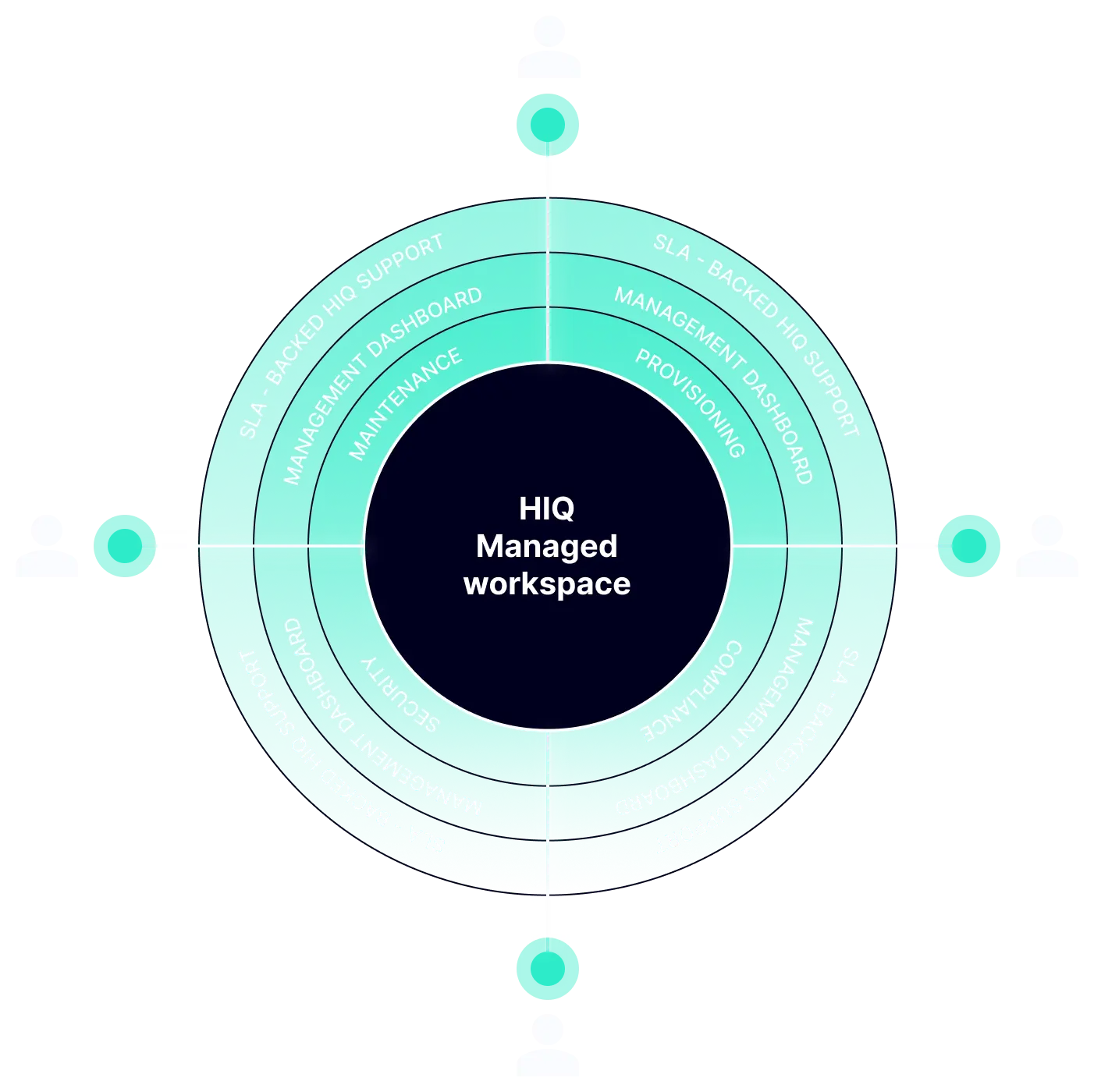
Concentric layers around a managed workspace.
Every one of these layers is in the price above. None of it is an add-on.
1
At the centre
THE WORKSPACE
A fully managed Windows 11 virtual desktop (cloud PC) that remote workers connect to from any device.
2
Four operational functions run continuously around it
OPERATED FOR YOU
Provisioning, compliance, security and maintenance - operated by us, not your IT team.
3
Two layers face the customer
VISIBLE TO YOU
A management dashboard with enterprise-wide visibility, and SLA-backed support for workers and management.
UNDERPINNED BY
Bare metal infrastructure operated by Happening Intelligence, in data centres local to your workforce.
CAPABILITIES
Three layers. All of it operated, none of it optional.
The layers map to the diagram above. Nothing here is sold separately or priced separately.
Operated for you
Four functions run continuously so your team never touches an endpoint.
Provisioning
Seats are ordered, not built. New workspaces delivered in days, pre-configured to your standard image.
Security
Curated, licensed and integrated tooling. MFA built in. Continuous posture monitoring rather than periodic audits.
ALSO IN THIS LAYER
→
Compliance monitoring
→
Maintenance and patching
→
Image lifecycle management
→
Configuration drift tracking
Visible to you
Enterprise-wide visibility, and one support path for everyone.
Management Dashboard
Seat inventory, compliance state and usage across the whole workforce, in one place.
SLA-Backed Support
One support path for workers and management, with response times contracted rather than best-effort.
ALSO IN THIS LAYER
→
Per-seat compliance evidence
→
Usage and capacity reporting
→
Audit export
→
Joiner, mover, leaver workflows
Underpinned by
Bare metal infrastructure, in data centres local to your workforce.
Bare Metal Infrastructure
No noisy-neighbour contention. Higher RAM, storage and vCores per seat than the alternatives.
Local Data Centres
Operated by Happening Intelligence in the regions your workforce actually sits in - latency and data residency both handled.
ALSO IN THIS LAYER
→
Daily backups
→
Configurable retention
→
Dedicated GPU options
→
Disaster recovery posture
All three layers are included in the $51, $69 and $86 prices above. There is no security tier, no compliance add-on and no premium support plan to buy on top.
COMPUTE & PERFORMANCE
RAM
8GB
16GB
32GB
Custom
vCores
6
8
10
Custom
STORAGE AND BACKUP
SSD storage
128GB
256GB
512GB
Custom
Daily backups
✓
✓
✓
✓
SECURITY AND COMPLIANCE
SIEM monitoring
✓
✓
✓
✓
Threat hunting
✓
✓
✓
✓
SSO / SAML
✓
✓
✓
✓
SUPPORT
Email support
✓
✓
✓
✓
24/7 priority support
✓
✓
✓
✓
Dedicated account manager
✓
✓
✓
✓
THE COMPARISON
At our prices, the major providers deliver less machine.
Same spend, side by side. And unlike both, the managed stack is included rather than something you still have to build.
PRICE
HAPPENING INTELLIGENCE
AWS WORKSPACES AT THIS PRICE
WINDOWS 365 CLOUD PC (BUSINESS) AT THIS PRICE
$51
Saver - 8 GB RAM, 6 vCores, 128 GB SSD
Performance - 2 vCPU, 8 GB RAM, 80 GB
2 vCPU, 8 GB RAM, 128 GB ($67.30)
$69
Standard - 16 GB RAM, 8 vCores, 256 GB SSD
Performance with storage uplift - 2 vCPU, 8 GB RAM, ~155 GB
2 vCPU, 8 GB RAM, 256 GB ($80.80)
$86
Engineers - 32 GB RAM, 10 vCores, 512 GB SSD
Performance with storage uplift — 2 vCPU, 8 GB RAM, ~250 GB
4 vCPU, 16 GB RAM, 128 GB ($104.80)
All prices per user, per month, AUD, ex-GST. Microsoft Windows 365 Business prices from microsoft.com/en-au (May 2026). AWS WorkSpaces prices converted from USD at 1 USD = 1.40 AUD; includes Windows RDS SAL fee and storage uplift where applicable. Neither figure includes the managed stack, which you would still need to build and operate.
Comparing against Citrix or Omnissa Horizon (formerly VMware Horizon) instead?
Neither publishes a public price, so no honest row can be added above. The difference is structural rather than numeric: with Citrix or Omnissa you licence software and then operate it — images, patching, the security stack and licensing all stay yours. Here they do not. Azure Virtual Desktop is priced by usage, not per seat: you pay for the Azure compute and storage you use, and you still run the images, patching and security yourself.
READY WHEN YOU ARE
Create your first workspace from $51 per seat.
Choose a configuration, confirm seats and region, and we provision the workspace, security stack, compliance monitoring and dashboard together. No sales call required.
No setup fee · No minimum term · Nothing charged until your instance is live
Frequently Asked Questions
Can I really start without talking to sales?

Yes, for Saver, Standard and Engineers. You choose a configuration, confirm seat count and region, and we provision the instance. Nothing is charged until it is live. Custom configurations need a conversation because the machine, retention and data-centre siting are all bespoke.
How quickly is my instance live?
The form takes a few minutes. Provisioning follows: most instances are live within two business days, because the workspace, security tooling, compliance monitoring and dashboard are all built and verified before hand-over. You can set a start date further out if you would rather it went live later. If you need a firm date for a specific go-live, book a call and we will commit to one.
Is the price really all-in?
Yes. Licensing, security tooling, compliance monitoring, patching, the management dashboard and SLA-backed support are all in the per-seat figure. There is no security tier, no compliance add-on and no premium support plan to buy on top. Every tier gets the same stack, including threat hunting and SSO/SAML.
Is there a minimum commitment?
No. Billing is monthly, there is no minimum term and no setup fee. Cancel with one day's notice and billing stops at the end of that period.
What counts as a seat?
One seat is one worker's workspace. Pricing is per seat, per month. You can start with a single seat and add more at any time - a new seat is an order, not a build, so it follows the same two-business-day provisioning. Remove a seat with one day's notice and billing stops with it.
Can I change configuration later?
Yes, at any time from the dashboard. Moving between Saver, Standard and Engineers takes effect from the next billing period, so you are never charged twice for the same seat in one month. If the configuration you picked turns out to be wrong for you, we will move you and credit the difference.
Where are the data centres?
You choose a region during setup: Australia, US and Canada, Europe, the Middle East, Asia or India. We run our own bare metal in data centres local to your workforce, which is what keeps latency low and keeps data residency documented rather than assumed. If you need a specific facility or a residency commitment in writing, book a call.